The Transmission Gap Report helps you monitor communication interruptions between your sensors and the Telsen platform. It allows you to quickly identify when a device has stopped transmitting data, how long the gap lasted, and when communication was restored - supporting better maintenance and compliance tracking.
Accessing the Transmission Gap Report
Go to the Reports tab in your Telsen dashboard.
Click View Transmission Gap.
You’ll be redirected to the Transmission Gap Report, where you can view a list of communication gaps detected across your connected devices.
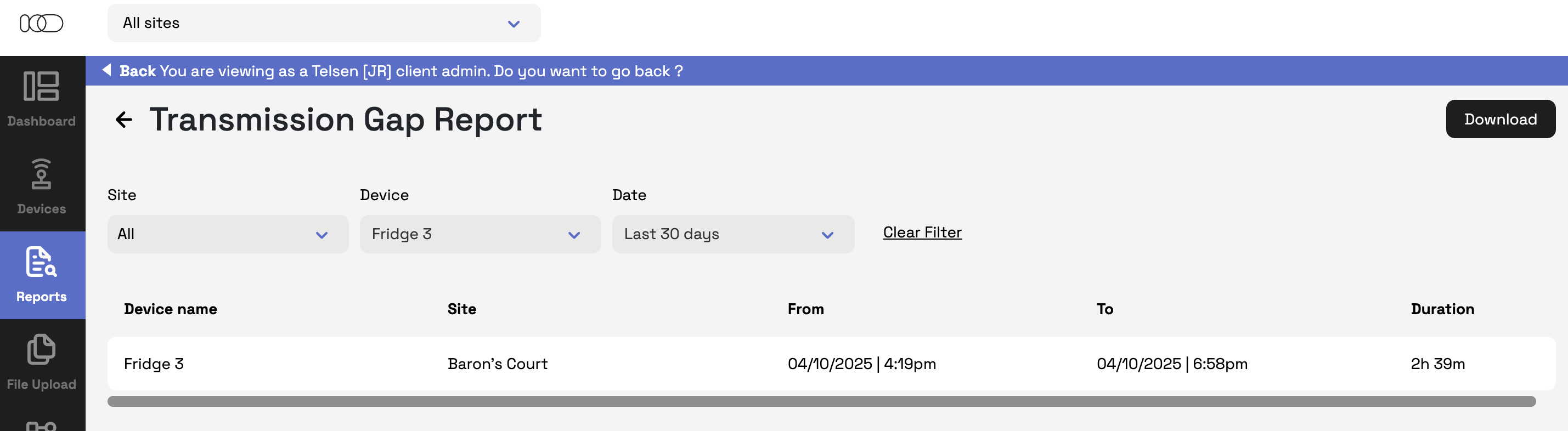
Understanding the Report Table
The table includes the following columns:
Device Name – The name of the device that experienced a transmission gap.
Site – The site where the device is installed.
From (Date | Time) – The start date and time of the gap (e.g., 04/10/2025 | 4:19 PM).
To (Date | Time) – The end date and time of the gap (e.g., 04/10/2025 | 6:58 PM).
Duration – The total length of time the device was not transmitting (e.g., 2h 39m).
Tip: Reviewing this data regularly helps identify connectivity issues early and ensure your temperature, humidity, or compliance data remains consistent.
Using Filters
You can refine your view using filters to focus on specific sites, devices, or time periods.
Site Filter
Use the dropdown to select your site
Device Filter
Choose a specific device to view only its data.
Only one device can be selected at a time.
Date Filter
Select the time range of data you want to view:
Last 24 hours (default)
Last 7 days
Last 30 days
Custom range – Opens a calendar where you can select start and end dates, then click Save.
Clear Filters
Click Clear Filters to reset all filters to their default settings.
Downloading the Report
You can download the Transmission Gap Report in several formats for record-keeping or analysis.
The Download button will be disabled if no data is available.
Click Download and select your preferred file type. The report will automatically download in that format.
Available formats: PDF, CSV.
Was this article helpful?
That’s Great!
Thank you for your feedback
Sorry! We couldn't be helpful
Thank you for your feedback
Feedback sent
We appreciate your effort and will try to fix the article