We recommend creating your Sites first, updating their details, and adding planned closures before assigning users and building workflows.
This approach gives you a clear view of how your business is organised, helps you separate operational areas correctly, and ensures your workflows, checks, and devices are all linked to the right physical location.
Sites
The Sites section is where you manage all operational locations across your business.
Each Site you create becomes a container for:
Workflows and checklists
Assigned users
Sensors and devices
Reporting and performance scoring
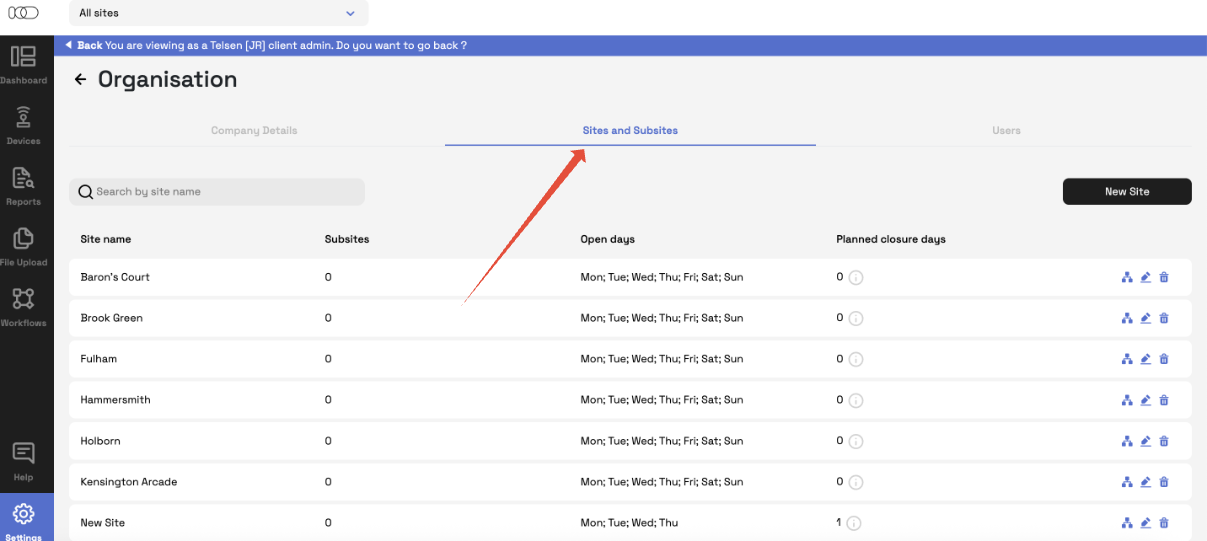
Creating a Site
Follow the steps below to set up a new site.
What you need
Company Admin
Telsen web app
How to add a new Site
Log in to the Telsen web app.
Select Settings from the left-hand menu.
Click Organisation.
Go to Sites and Subsites.
Click New Site in the upper-right corner.
Enter the Site name
Add Open days and Planned closure days (Scheduled workflows will not appear in reports for that day)
Click Save.
Your Site is now created and ready to be assigned to workflows, users, and devices.
Closed Days / Planned closure days
Planned closure days help maintain accurate reporting and avoid unnecessary alerts.
What planned closures do
When a planned closure day is added:
Scheduled workflows will not appear in reports for that day
Teams won’t receive alerts or tasks for a location that is closed
Dashboards and scoring remain accurate and fair
This prevents wrongful “missed tasks” or “non-compliance” on days a Site was not operating.
Next steps
Once your Sites are created, continue to Part 2 where you’ll learn how to:
Assign users to Sites
Was this article helpful?
That’s Great!
Thank you for your feedback
Sorry! We couldn't be helpful
Thank you for your feedback
Feedback sent
We appreciate your effort and will try to fix the article