Get your monitoring system up and running in minutes.
Your Telsen gateway and sensors work together to automatically monitor temperatures across your appliances.
Follow the simple steps below to get everything connected and online.
1. What’s in the Box
Inside your delivery, you’ll find:
One or more Telsen Gateways
1 × Power Adapter for each Gateway
1 × Ethernet Cable for each Gateway
Your Sensors, each labelled with a number
Sticky pads for mounting the sensors
2. Setting Up Your Gateway
The gateway is the heart of your Telsen system. It collects temperature readings from your sensors and sends them to your Telsen dashboard.
Tip: For best signal strength, place the gateway somewhere central to your kitchen or food storage area - ideally with a clear line of sight to most appliances.
Step 1: Connect the Gateway
Plug in the Ethernet cable:
One end goes into the Ethernet port on the Telsen gateway.
The other end goes into a live LAN port on your modem or router.
Make sure this is inserted correctly and you hear the 'click'.
(Telsen gateways connect by Ethernet only, not Wi-Fi.)
Connect the power:
Plug the power adapter into the gateway and then into a wall socket.
Turn on the power.
Once connected, the lights will begin to flash as the gateway starts up.
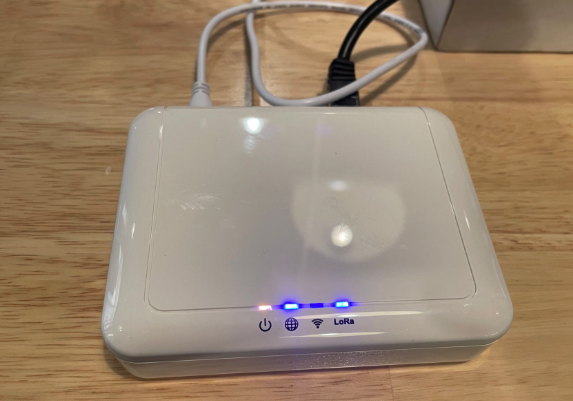
After a few seconds, they’ll stabilise - you should see:
| Light | Status | Meaning |
| 1st | Solid | Power is on |
| 2nd | Solid | Connected with Ethernet (LAN) |
| 3rd | Off | Normal - not used |
| 4th | Solid | Connected to Telsen |
It may take up to 10 minutes for all your sensors to appear online in Telsen. Don’t worry if some stay red at first - they’ll turn green automatically once they connect.
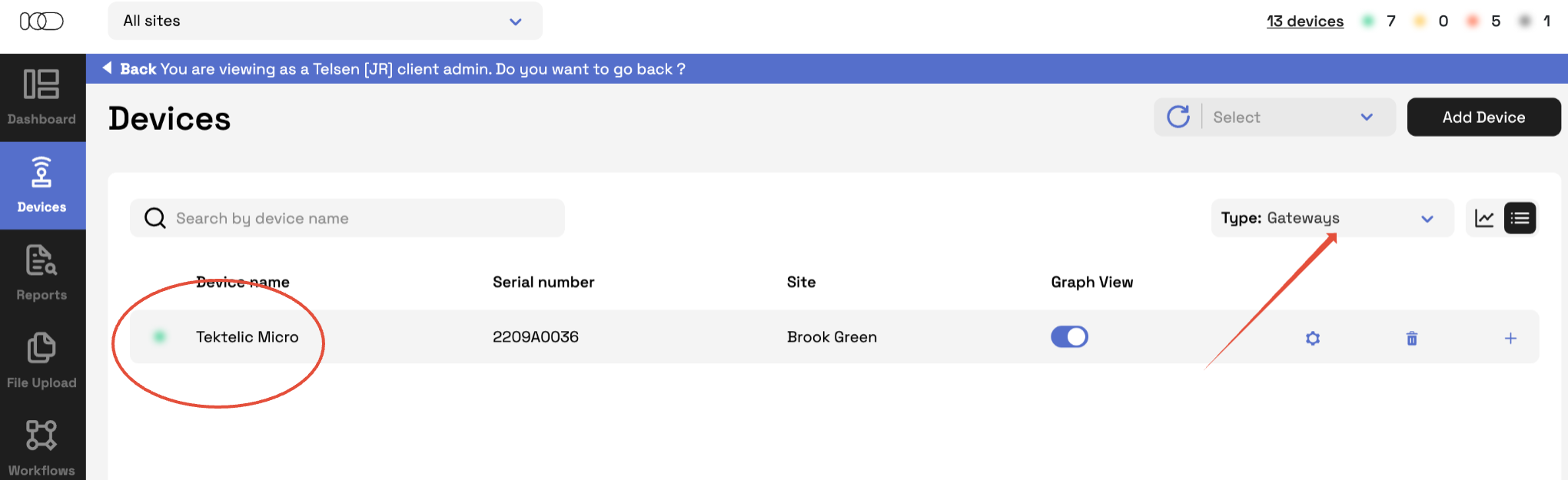
Step 2: Confirm Your Gateway is Online
On your desktop, log in to Telsen.
Go to Devices → Gateways → List View.
Your gateway should show as green (online).
If it doesn’t after 10 minutes, double check:
The Ethernet cable is fully clicked in at both ends.
The lights match the pattern above.
If it’s still offline, contact the Telsen support team.
3. Installing the Sensors
Your sensors measure appliance temperatures and send readings to your gateway every 10 minutes.
Step 1: Check Sensor Connection
In your Telsen dashboard, go to Devices → Sensors.
Wait until all sensors appear green (online) before placing them - this confirms they’re connected and ready.
Step 2: Position Each Sensor
Choose the spot:
Place the sensor mid level inside the appliance, not right at the top or bottom.
Avoid attaching to a removable shelf or anywhere likely to be bumped or cleaned often.
Prepare the surface:
Wipe away any condensation so the pad sticks properly.
Attach the sensor:
Stick a sticky pad to the back of the sensor.
Remove the tape cover and press firmly to fix it in place.
Check the data:
Back in Telsen, you’ll start seeing readings appear within 10-15 minutes.
✅ That’s it - you're now automatically recording temperatures!
4. Best Practice Tips
Keep sensors away from fans, vents, and direct airflow.
Never submerge or place in standing water or ice.
Always mount sensors towards the back or middle of the appliance for the most consistent readings.
Use the same position across similar appliances - a quick photo reference can help future checks.
Don’t cover the air hole on the sensor.
Need a Hand?
If you’re unsure or something doesn’t look right, reach out to your Telsen contact - we can verify your setup remotely.
Was this article helpful?
That’s Great!
Thank you for your feedback
Sorry! We couldn't be helpful
Thank you for your feedback
Feedback sent
We appreciate your effort and will try to fix the article