If you are not using sensors, you will need to manually add appliances in this section so temperature readings can be recorded manually.
- Go to Settings > Equipment > Appliances
- Add New Appliance and assign to the correct site
You can add common appliances such as:
Fridge
Freezer
Dishwasher
Once added, these appliances will appear in your HACCP workflows on the Telsen mobile app, where staff can type in manual temperature readings during their checks.
Tip: Make sure each appliance has a clear name (e.g., “Walk-in Freezer 1”) so staff can easily identify it when completing workflows.
Probes
- See guide on how to use your probe for HACCP checks
As soon as you complete your first workflow using a connected probe, it will appear in this section.
From here you can:
Edit and manage probe details.
See when the probe is next due for calibration to maintain accuracy and compliance.
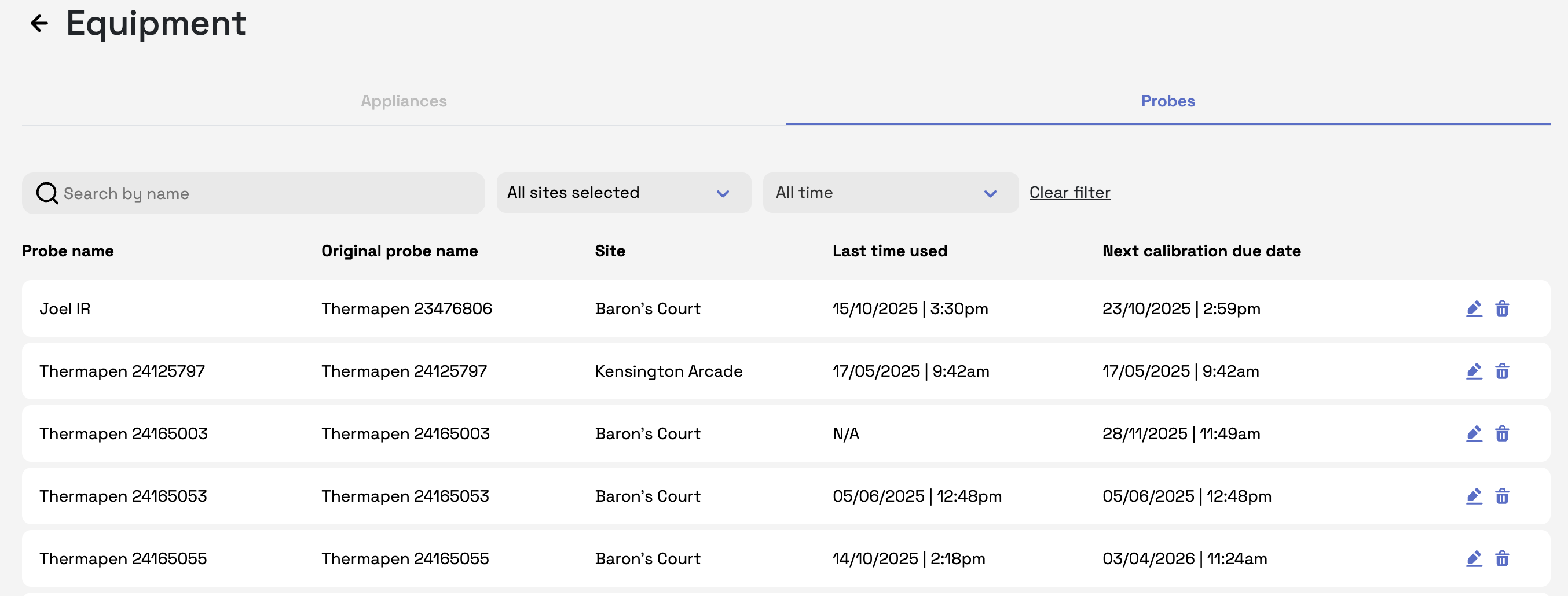
Note: Keeping probe calibration dates up to date is important for HACCP compliance.
Was this article helpful?
That’s Great!
Thank you for your feedback
Sorry! We couldn't be helpful
Thank you for your feedback
Feedback sent
We appreciate your effort and will try to fix the article