This guide explains how to set up and manage your notification preferences in Telsen so you never miss important alerts.
Go to your profile in the top right-hand corner. Open profile and scroll down to Notifications.
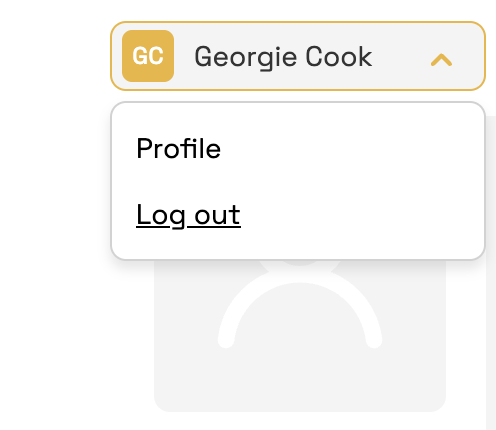
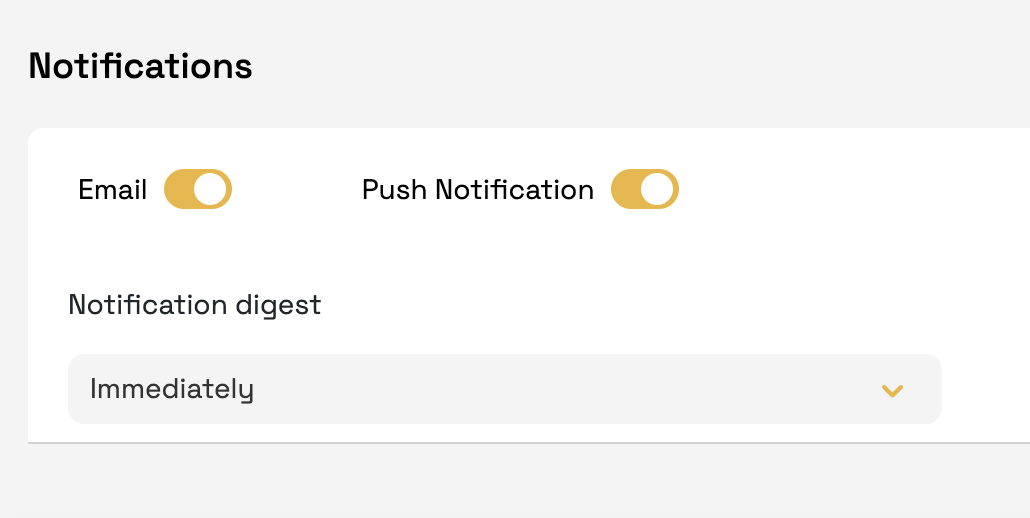
Select how you’d like to receive alerts:
Email - Alerts are sent to your registered email address.
Push Notifications – Alerts appear on your mobile device through the Telsen app.
We recommend enabling all available methods for full coverage.
Configure Notification Digest
By default, Telsen sends alerts immediately when an event is triggered. You can change this setting:
Immediately (default): You’ll be notified as soon as an alert occurs.
Every x hours: Alerts are grouped and sent accordingly
Daily: Alerts are grouped and sent once per day at a chosen time.
⚠️ If your digest is set to 12 PM and an alert occurs at 10 AM, you will not be notified until 12 PM. For critical alerts, we recommend keeping the setting as Immediately.
Device Notification Settings
Device-level settings can override Telsen preferences. Make sure:
Notifications are enabled for the Telsen app on your device.
Do Not Disturb, Focus, or Sleep modes are not blocking notifications.
Troubleshooting
If notifications aren’t coming through:
Check that your preferences are saved in Telsen.
Verify your email address is correct.
Confirm notifications are enabled on your device.
Ensure the Telsen app has notification permissions (iOS/Android).
Was this article helpful?
That’s Great!
Thank you for your feedback
Sorry! We couldn't be helpful
Thank you for your feedback
Feedback sent
We appreciate your effort and will try to fix the article