Once a probe has been used for the first time in the Telsen mobile app, it automatically appears under the Equipment section in your account. You can rename your probe at any time to make it easier to identify - especially useful if your site uses multiple probes.
How to Rename Your Probe
Log in to your Telsen dashboard on desktop.
Go to the Settings tab.
Select Equipment
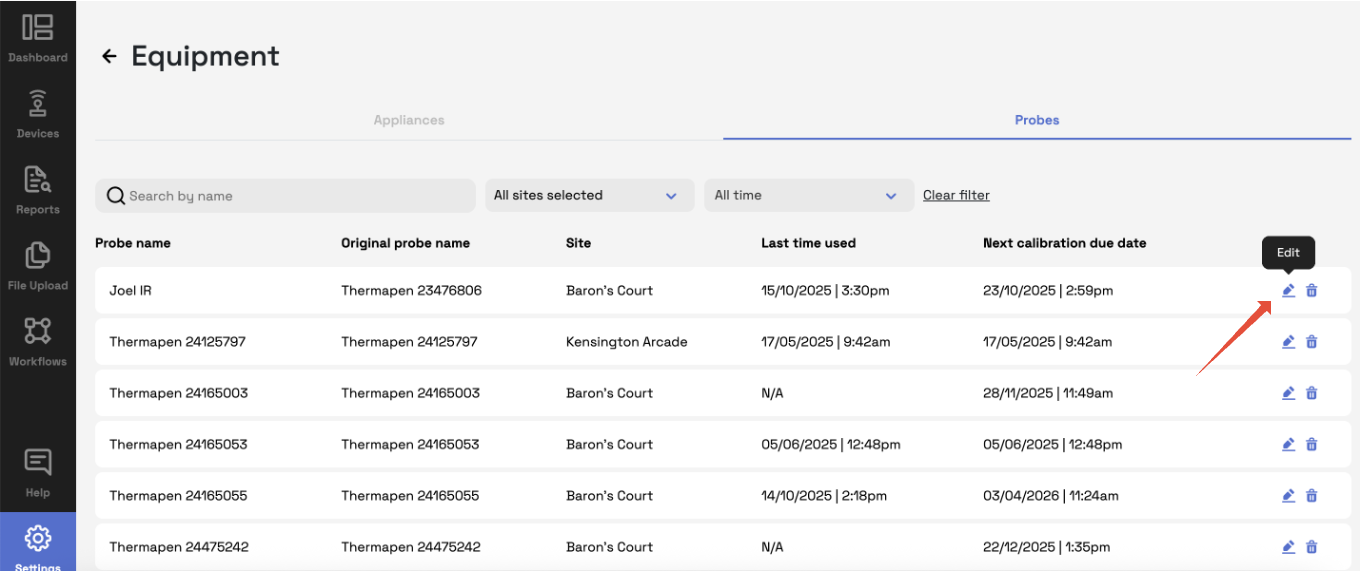
You’ll see a list of all devices linked to your organisation, including any probes that have been used at least once on the mobile app.
Find the probe you want to rename.
Click Edit (or the pencil icon ✏️) next to the probe name.
Enter the new name - for example, Walk-in Fridge Probe or Main Kitchen Sensor.
Click Save to confirm your changes.
Tip: Use clear, descriptive names so staff can easily select the right probe when completing HACCP checks on the mobile app.
Important Notes
Probes will only appear in the Equipment list after they have been connected and used at least once in the Telsen app.
Renaming a probe does not affect its stored data or calibration settings.
The updated name will automatically appear on the mobile app for all users.
Was this article helpful?
That’s Great!
Thank you for your feedback
Sorry! We couldn't be helpful
Thank you for your feedback
Feedback sent
We appreciate your effort and will try to fix the article